
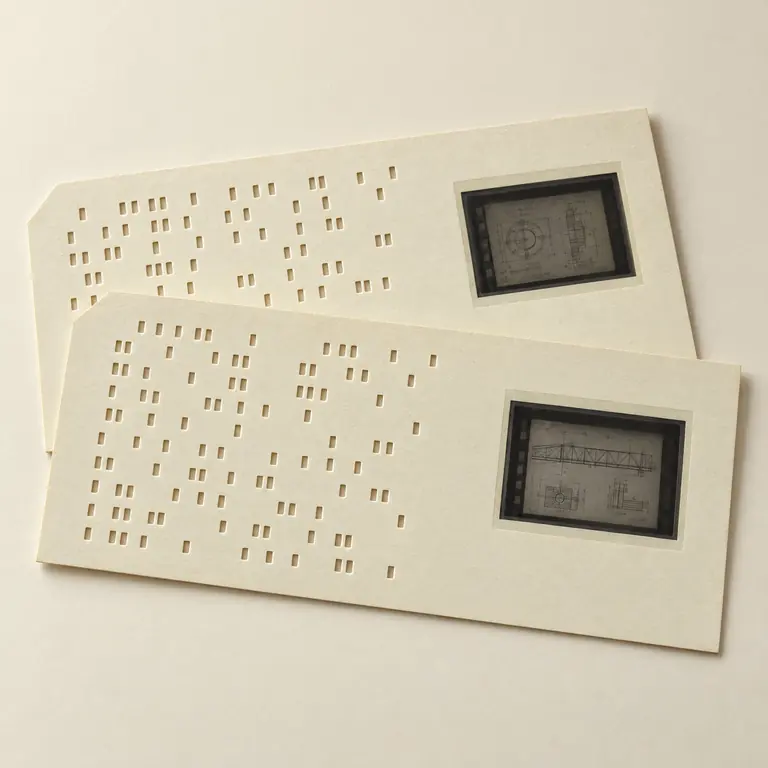
The card context and mounted image each matter.
The card and the image tell different stories.
What aperture-card scanning produces
An aperture card holds a microfilm frame. Digitizing that frame produces a raster image: a grid of pixels representing the photographed drawing. The image can be displayed, zoomed, printed, attached to an index, and processed for OCR. It can preserve visual evidence of lines, notes, dimensions, and title-block text at the quality present in the source film.
For planning, distinguish a full-detail raster capture from an access derivative. The first can support future derivative creation or reprocessing when requested; the second can be optimized for everyday viewing or repository use. The card face and punched pattern may also need to be delivered or documented as associated evidence.
What a CAD file preserves
CAD formats use mathematical expressions to create multi-dimensional vector graphics for engineering and manufacturing design. A vector drawing can preserve editable lines, objects, layers, and other process-support functions. The Library of Congress contrasts that functionality with a flattened bitmap, where the visual appearance may remain but the underlying drawing structure does not.
A scan does not automatically recover the original authoring decisions, layer names, object relationships, or scale logic. OCR may recognize some title-block text, but it does not convert line work into intelligent geometry. Treat any claim of “CAD conversion” as a separate deliverable definition, not a synonym for scanning.
| Outcome | What it provides | What it does not automatically provide |
|---|---|---|
| Raster scan | Pixel-based visual surrogate of the film image | Editable vectors, layers, or engineering objects |
| Searchable raster PDF | Image plus a text-search layer when specified | Validated drawing geometry |
| Vectorization/redrafting | New vector geometry under a defined specification | A guarantee that every source mark can be interpreted |
| Born-digital CAD import | Original available CAD file transferred as its own object | A replacement for the aperture-card evidence |
Specify vector work separately
If editable geometry is required, define target format, expected scale or units, drawing types, layers and attributes, title-block treatment, tolerances, conventions for uncertain lines, and review criteria. Source condition matters: faint lines, reduced text, distortions, and missing detail cannot safely be assumed to have one unambiguous vector interpretation.
Fictional example — no PII: a request for “DWG output with architectural, electrical, and annotation layers” is a vector-redrafting scope. A request for “searchable images linked to drawing number and revision” is a raster capture and indexing scope. The work may be related, but the acceptance criteria are different.
Keep images and metadata traceable
For a document-management workflow, a stable identifier can connect the raster file, source card, title-block metadata, OCR status, and any separate vector file. Retaining that relationship helps users distinguish a source-image record from a newly created redrawn file rather than treating one as proof of the other.
National Microfilm can discuss aperture-card raster capture, indexing, OCR support, and customer-defined delivery packages. Any vectorization or CAD-redrawing requirement should be assessed and documented as its own project element.
Common questions
Can a TIFF or PDF from an aperture card be edited like a CAD drawing?
No. TIFF and scanned PDF files are raster images; they do not contain the original vector objects or layers.
Does OCR create CAD text objects?
No. OCR can create machine-readable text for search or extraction, but it does not rebuild engineering geometry or CAD entities.
Should existing CAD files be discarded after scanning cards?
No. When available, born-digital CAD files should be retained and managed as their own records alongside the card-derived images.
Sources & further reading
These references explain technical formats, standards or destination requirements. They do not imply endorsement of National Microfilm.